DolphinDB Alpha Factors Plugin
Use DolphinDB's institutional-grade alpha factors on your data effortlessly, without the DolphinDB expertise.
The DolphinDB Alpha Factor Library adapts over 100 validated mid- to low-frequency factors — drawn from industrical research and academic literature — to high-frequency data: minute-level OHLCV bars, level-2 market snapshots, tick-by-tick orders, and tick-by-tick trades. These institutional-grade factors capture micro-level market states — order flow direction, book imbalance, trade impact — that low-frequency factors miss, converting transient high-frequency signals into stable, predictive features for daily and hourly strategy horizons.
| Category | Count | Data Source | Description |
|---|---|---|---|
minute_kline | 31 | 1-min OHLCV bars | Factors from aggregated minute-level price/volume |
tick_trade | 24 | Individual trade records | Factors from tick-level trade activity |
l2_snapshot | 57 | 1-min order book snapshots | Factors from bid/ask depth and spread |
tick_entrust | 3 | Order-by-order (MBO) data | Factors requiring individual order tracking |
For users without DolphinDB expertise, the dolphindb_factor_library plugin provides a turnkey solution for integrating these factors into your quantitative workflows. It takes advantage of the QuantFlow DataInfra framework and automates the entire factor pipeline — from raw market data ingestion to production-ready feature generation — with minimal configuration and no custom code.
The core QuantFlow modules used by the plugin:
- Metadata (
quantflow.metadata) — YML-driven schema definitions. Feed provider configs define source→target column mappings, DDB transformation expressions, and aggregation rules. No Python mapping code needed. - DolphinDB Engine (
quantflow.io.dolphindb_engine) — Connection management with auto-reconnect, Arrow-to-DDB type conversion, table CRUD, and database lifecycle (create, validate, drop). The unifiedDBEngineinterface that all DDB operations flow through. - Ingest (
quantflow.ingest) —DatabentoReaderreads MBP-1 DBN files as Arrow tables.IngestOrchestratoruploads to in-memory DDB temp tables and runs server-side SQL transforms to populate target tables. - Ray Executor (
quantflow.pipeline) — Parallel multi-file ingest viaRayBatchExecutorwith per-worker DDB connections.--parallelflag enables distributed processing.
CLI Commands
| Command | Syntax | Description |
|---|---|---|
init | qf ext alpha-factors init [name] [-d DIR] | Create a project with 115 factor scripts and YML configs |
list | qf ext alpha-factors list [-c CATEGORY] [-D] | List all 115 factors, filter by category |
view | qf ext alpha-factors view <name> [-s] | Inspect factor metadata; -s shows full .dos source |
ingest | qf ext alpha-factors ingest -j JOB [-s DATE] [-e DATE] [--parallel] | Ingest market data and map to DDB target tables required by the factors |
compute | qf ext alpha-factors compute [name|--all] [-d DIR] | Compute factors and write results to ft_features |
submit | qf ext alpha-factors submit [name|--all] [-d DIR] | Generate DolphinDB submitJob scripts for offline execution |
Get Started
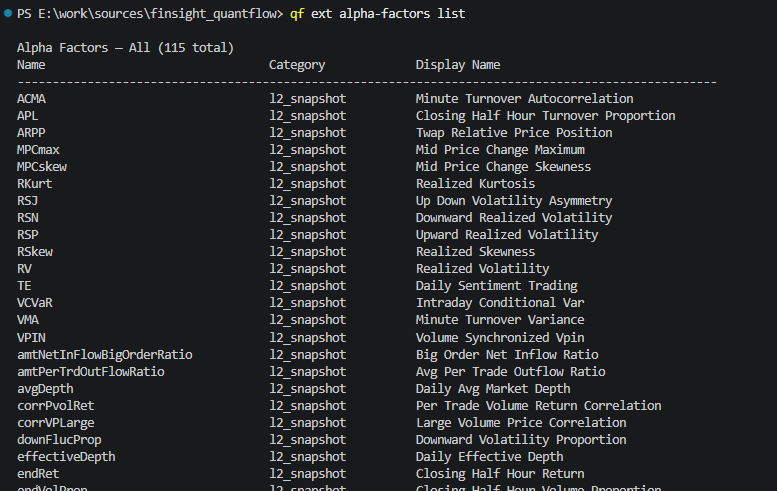
list — Explore Available Factors
qf ext alpha-factors list [-c CATEGORY] [-D]
Lists all 115 registered factors with name, category, and display name. Use -c to filter by category (minute_kline, l2_snapshot, tick_trade, tick_entrust). Use -D for detailed descriptions.
view — Inspect a Factor
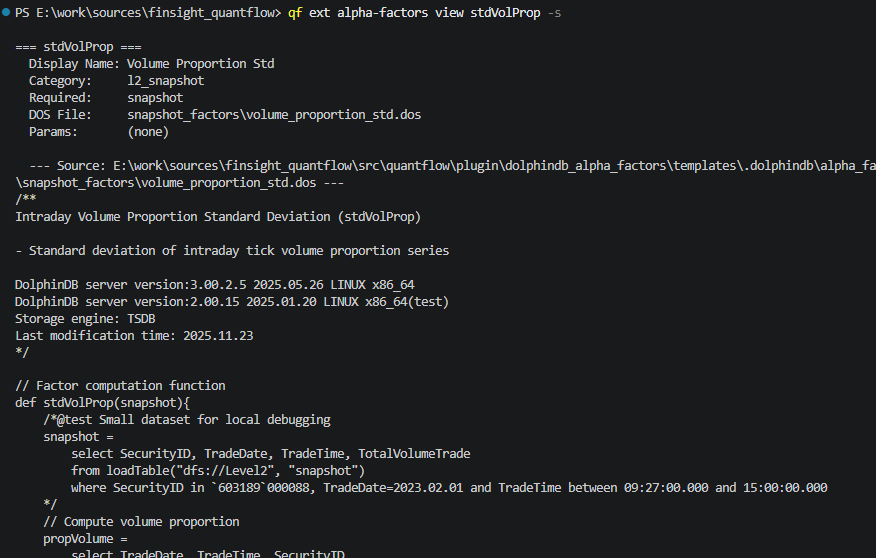
qf ext alpha-factors view <name> [-s]
Displays factor metadata (display name, category, required tables, description). Use -s to show the full .dos source code.
init — Create a Project
qf ext alpha-factors init [name] [-d PROJECT_DIR]
The generated project structure:
my_factors/
├── dolphindb_project.yml          # Main config: factor list, bar sizes, storage, ingest
├── .local_config.yml              # Credentials: Databento API key, DolphinDB host/port
├── .definitions/
│   └── feed_providers/
│       └── equities_databento_historical.yml   # MBP-1 → DDB field mappings + schema DDL
└── .dolphindb/
    └── alpha_factors/
        ├── minute_kline_factors/   # 31 factors from 1-min OHLCV bars
        ├── snapshot_factors/       # 57 factors from L2 order book snapshots
        ├── tick_trade_factors/     # 24 factors from individual trade records
        └── tick_entrust_factors/   #  3 factors from order-by-order data (MBO)
| File | Purpose |
|---|---|
dolphindb_project.yml | Factor list with per-factor bar_size, storage target (ft_features), and ingest feed reference. Edit this to enable/disable factors or change timeframes. |
.local_config.yml | DolphinDB connection (host, port, username, password) and Databento API key. Edit this first after init. |
.definitions/feed_providers/*.yml | Declares how MBP-1 columns map to factor-expected tables. Each data_type defines schema_attributes (target columns), field_mappings (source→target with DDB transformations), group_by, and row_filter. |
.dolphindb/alpha_factors/ | All 115 .dos factor scripts organized by category. Each file defines a single def functionName(table) — the factor computation logic. These run unchanged on the DDB server. |
Configure the project
Edit the generated files before running ingest. Start with .local_config.yml:
# .local_config.yml
feed_provider_credentials:
  - provider: equities_databento_historical
    key: "your-databento-api-key"

engine:
  - name: dolphindb
    host: "127.0.0.1"
    port: 8848
    key:
      username: "admin"
      password: {password}
Then review dolphindb_project.yml to select factors and bar sizes:
# dolphindb_project.yml
factor_storage:
  database: "dfs://quantflow_db"
  table_name: "ft_features"
  engine: "TSDB"

factors:
  - name: illiqShortCut
    enabled: true
    bar_size: ["1d", "1h"]
  - name: flashReturns
    enabled: true
    bar_size: ["1d"]
  - name: lcp
    enabled: true
    bar_size: ["1h", "5min"]
ingest — Ingest Market Data
qf ext alpha-factors ingest -j JOB_ID [-d PROJECT_DIR] [-f FEED_NAME]
    [-s START_DATE] [-e END_DATE] [-b BATCH_SIZE] [--parallel] [-c MAX_CONCURRENCY]
| Flag | Default | Description |
|---|---|---|
-j, --job-id | (required) | Databento batch job ID |
-d, --project-dir | . | Project directory |
-f, --feed-name | equities_databento_historical | Feed provider name |
-s, --start-date | — | Start date YYYY-MM-DD |
-e, --end-date | — | End date YYYY-MM-DD |
-b, --batch-size | 200000 | Rows per DDB write batch |
-p, --parallel | off | Use Ray parallel workers |
-c, --max-concurrency | 4 | Max parallel workers |
The ingest pipeline:
- creates DolphinDB database and tables if they don't exist
- uploads source data to in-memory temp tables
- applies YML-driven schema transforms via generated DDB SQL
- maps data into DolphinDB factor schemas
- appends into partitioned target tables
compute — Compute Factors
qf ext alpha-factors compute [name] [--all] [-d PROJECT_DIR]
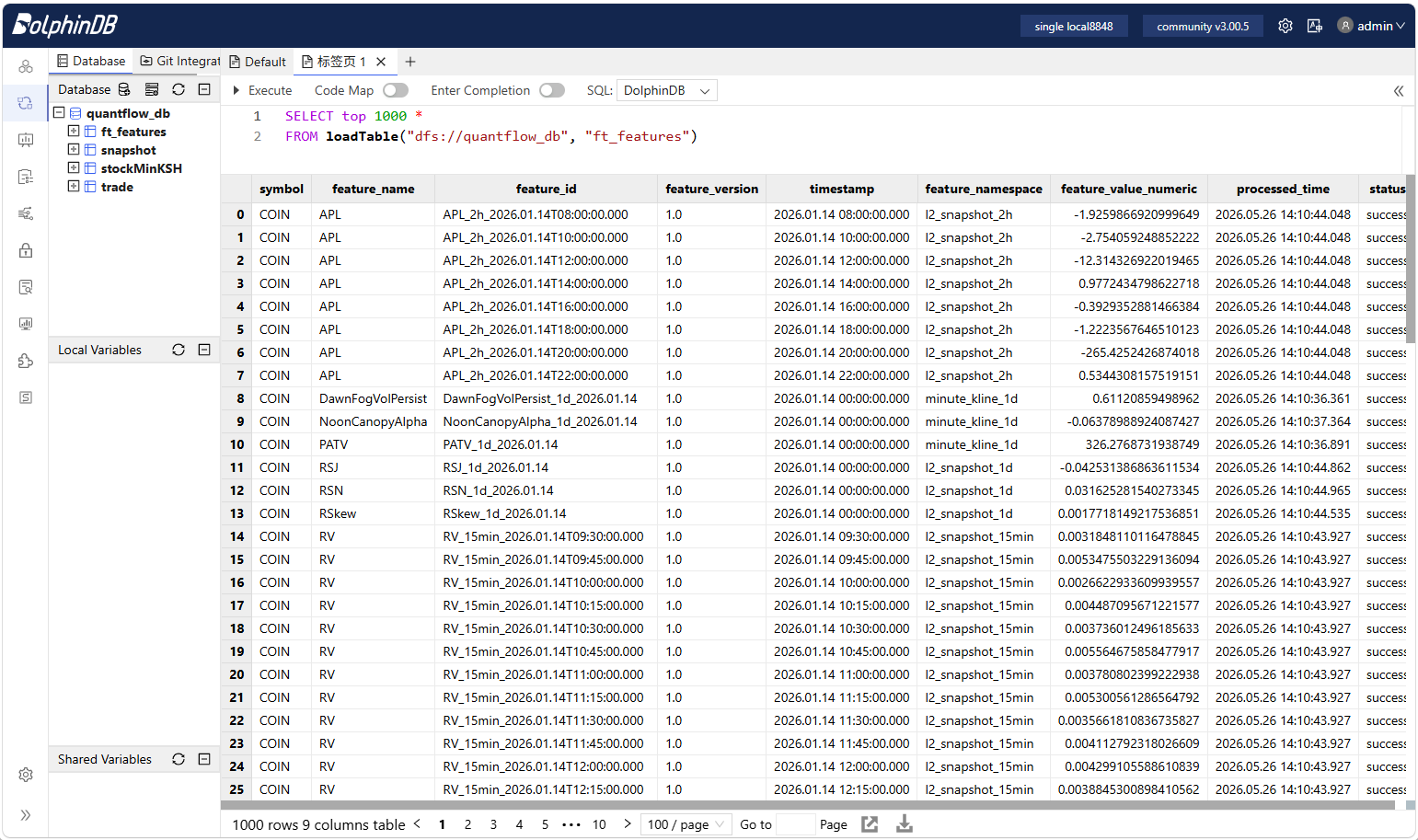
Computes factors from ingested data and writes results to ft_features. Specify a factor name, --all for all categories, or omit both to use the factors listed in dolphindb_project.yml.
The computed factors are written to the target storage defined in dolphindb_project.yml (default is ft_features in dfs://quantflow_db). The plugin generates and executes DolphinDB SQL scripts on the server, so all computations run natively in DolphinDB without data transfer overhead.
Customization
Add Your Own Data Feeds
For the current version, Databento is the only built-in data feed. To add your own data source, create a new YML config under .definitions/feed_providers/ following the existing templates. The config defines how your source data maps to the target tables expected by the factors.
Example stockMinKSH definition from the Databento MBP-1 feed provider:
stockMinKSH:
  name: stockMinKSH
  stream: "mbp-1"
  table_name: stockMinKSH
  partition_by: [SecurityID, TradeDate]

  schema_attributes:
    SecurityID:   { dtype: STRING,    required: true }
    TradeDate:    { dtype: DATE,      required: true }
    TradeTime:    { dtype: TIME,      required: true }
    DateTime:     { dtype: TIMESTAMP, required: true }
    PreClosePx:   { dtype: DOUBLE,    required: false }
    OpenPx:       { dtype: DOUBLE,    required: false }
    HighPx:       { dtype: DOUBLE,    required: false }
    LowPx:        { dtype: DOUBLE,    required: false }
    LastPx:       { dtype: DOUBLE,    required: false }
    Volume:       { dtype: DOUBLE,    required: false }
    Amount:       { dtype: DOUBLE,    required: false }
    TradeMoney:   { dtype: DOUBLE,    required: false }

  field_mappings:
    - { target: SecurityID, source: symbol }
    - { target: TradeDate,  source: ts_event, transformation: "date(ts_event)" }
    - { target: DateTime,   transformation: "first(bar(ts_event, 60000))" }
    - { target: TradeTime,  source: ts_event, transformation: "time(ts_event)" }
    - { target: OpenPx,     source: price, aggregation: first }
    - { target: HighPx,     source: price, aggregation: max }
    - { target: LowPx,      source: price, aggregation: min }
    - { target: LastPx,     source: price, aggregation: last }
    - { target: Volume,     source: size,  aggregation: sum }
    - { target: Amount,     source: "price * size", aggregation: sum }
    - { target: PreClosePx, transformation: "0.0" }
    - { target: TradeMoney, transformation: "LastPx * Volume" }

  group_by: [symbol, "date(ts_event) as TradeDate", "bar(ts_event, 60000) as minBar"]

  enabled: true
All transformations execute server-side as generated DolphinDB SQL — no Python ETL code required. To add a new data source, copy the template and rewrite field_mappings and group_by accordingly. There is no need to edit the schema_attributes unless you have added custom factors that require new columns.
Edit or Add Factors
Each factor is a standalone .dos script under .dolphindb/alpha_factors/. A factor script defines a single function:
def factorName(table) {
    // factor computation logic
    return select ... from table group by TradeDate, SecurityID;
}
To edit an existing factor:
- Run
qf ext alpha-factors view <name> -sto see the.dossource - Open the file in any editor — the scripts are plain DolphinDB SQL
- Modify parameters, windows, or logic as needed
- Re-run
computeto pick up the changes
To add a new factor:
- Write a
.dosscript following thedef functionName(table)convention and place it in the appropriate category folder - Add a corresponding entry in
dolphindb_project.yml:
factors:
  - name: myNewFactor
    enabled: true
    bar_size: ["1d", "1h"]
- Run
qf ext alpha-factors compute --factor myNewFactorto test
All edits live inside your project directory — they survive plugin updates and can be version-controlled.